ParkFlow: From Requirements Gathering to an AI-Assisted MVP
How we turned a real parking problem into an MVP with TypeScript, Supabase, license-plate-driven UX, and AI-assisted development.
ParkFlow started as the final project of the first semester of the Systems Analysis and Development program, in the Prompt Engineering and AI Applications course.
The proposal was to build a parking system with the support of artificial intelligence and a vibe coding tool. However, the project stopped being just a quickly generated screen once we started discussing business rules, operator experience, data integrity, and technical limitations.
This article documents the MVP creation process, the main decisions made, and what I learned during development.
ParkFlow is an educational and prototyping project. Features related to cameras, license-plate recognition, barrier gates, and other devices should be treated as simulations or future possibilities until a real, validated integration exists.
The problem we wanted to solve
Running a parking lot involves more than registering a car entering the premises.
A system like this needs to answer questions such as:
- how many spots are still available?
- is a given vehicle already in the parking lot?
- how much should be charged for the parking time?
- does the customer have an active monthly subscription?
- how do we preserve the history of entries, exits, and payments?
- how do we prevent data from different accounts from getting mixed?
We also realized that customer service could slow down if the operator had to fill in name, CPF, and complete vehicle details at every entry.
The central idea of ParkFlow became:
Centralize and streamline parking lot operations, reducing manual tasks and inconsistencies.
Requirements gathering
Before treating the project as a product, we organized the requirements into categories.
Functional requirements
Among the features identified were:
- registering vehicle entries;
- issuing receipts with a QR Code or barcode;
- calculating the fee based on parking time;
- registering monthly subscribers and tracking payments;
- generating daily and monthly revenue reports.
Non-functional requirements
We also recorded expectations related to system quality:
- responsive interface;
- fast entry registration;
- data protection;
- availability during operation;
- backup strategy.
These items were defined as project requirements, but they should not be mistaken for proven guarantees. Metrics such as 99,9% availability, full encryption, and automatic backup require specific implementation, infrastructure, and testing.
Less obvious requirements
Some needs only surface when we think about real-world operation:
- preventing two active entries for the same license plate;
- freeing the spot after exit;
- keeping change logs;
- preserving history for several years;
- migrating data from old spreadsheets;
- configuring thermal printers and barrier gates in the future.
This survey showed that a good-looking interface would not be enough. The system needed to represent operational rules.
The project’s technical foundation
The structure analyzed in the project uses:
| Area | Technology or organization |
|---|---|
| Language | TypeScript |
| Web application | Vite |
| Runtime and dependencies | Bun |
| Backend and database | Supabase |
| Versioned database | Migrations |
| Quality | ESLint and Prettier |
| Interface | Components and styles organized within the project |
The main organization was separated by responsibility:
src/
├── components/
├── hooks/
├── integrations/
├── lib/
├── routes/
├── router.tsx
├── server.ts
└── styles.css

supabase/
├── migrations/
└── config.toml

docs/
└── prompts/
The intent of this structure is to keep interface, reusable rules, integrations, and data access from getting mixed together.
A simplified view of the architecture is:
flowchart LR
    U[Operador ou administrador] --> UI[Aplicação web]
    UI --> AUTH[Autenticação]
    UI --> MOD[Operações e gestão]
    MOD --> DB[(Supabase)]
    DB --> UI
    MOD --> INT[Integrações simuladas ou futuras]
How we used AI during development
One of the main lessons was not trying to generate the entire system with a single prompt.
We split requests by responsibility:
- interface and UX;
- authentication;
- backend;
- database;
- spot management;
- billing;
- testing;
- future integrations;
- specific refinements.
The format that helped the most was:
Contexto
Problema atual
Objetivo
Regras de negócio
Requisitos técnicos
O que não deve ser alterado
Resultado esperado
We also used a specific prompt to analyze and improve other prompts before execution. The idea was to identify missing context, ambiguities, architecture risks, and forgotten requirements.
The workflow ended up looking close to this:
flowchart LR
    A[Identificar problema] --> B[Escrever prompt específico]
    B --> C[Revisar contexto e restrições]
    C --> D[Executar alteração]
    D --> E[Testar resultado]
    E --> F{Resolveu?}
    F -- Não --> B
    F -- Sim --> G[Documentar decisão]
In practice, the prompt started working as a small technical specification. The clearer the rules, the lower the chance that a change would break unrelated parts.
First version: fast, but not yet operational
The first generated version let us visualize the MVP quickly. It already featured modules such as dashboard, Smart Check-in, Smart Gate, monitoring, spot map, vehicles, plans, and settings.
However, the interface had many items with the same visual priority, large cards, and spacing that did not help the operator make decisions.
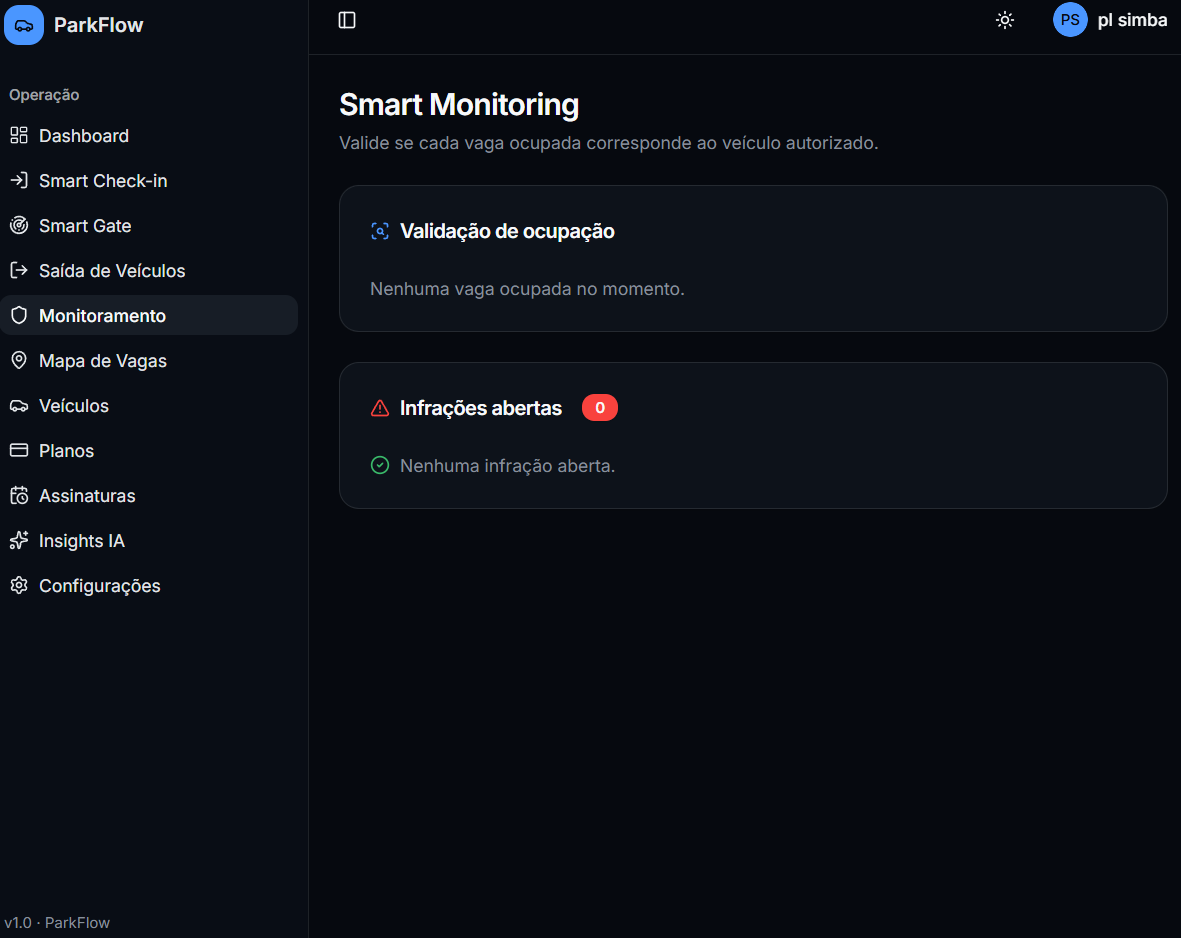
The problem was not merely aesthetic. The screen needed to look like an operations center, not a collection of independent pages.
Refining the interface as an operations center
The refinement reorganized navigation into groups such as:
Operações
Gestão
Sistema
The cards became more compact, and the dashboard started prioritizing information such as:
- free spots;
- revenue of the day;
- vehicles served;
- average stay duration;
- entry flow;
- recent activities;
- operational alerts.
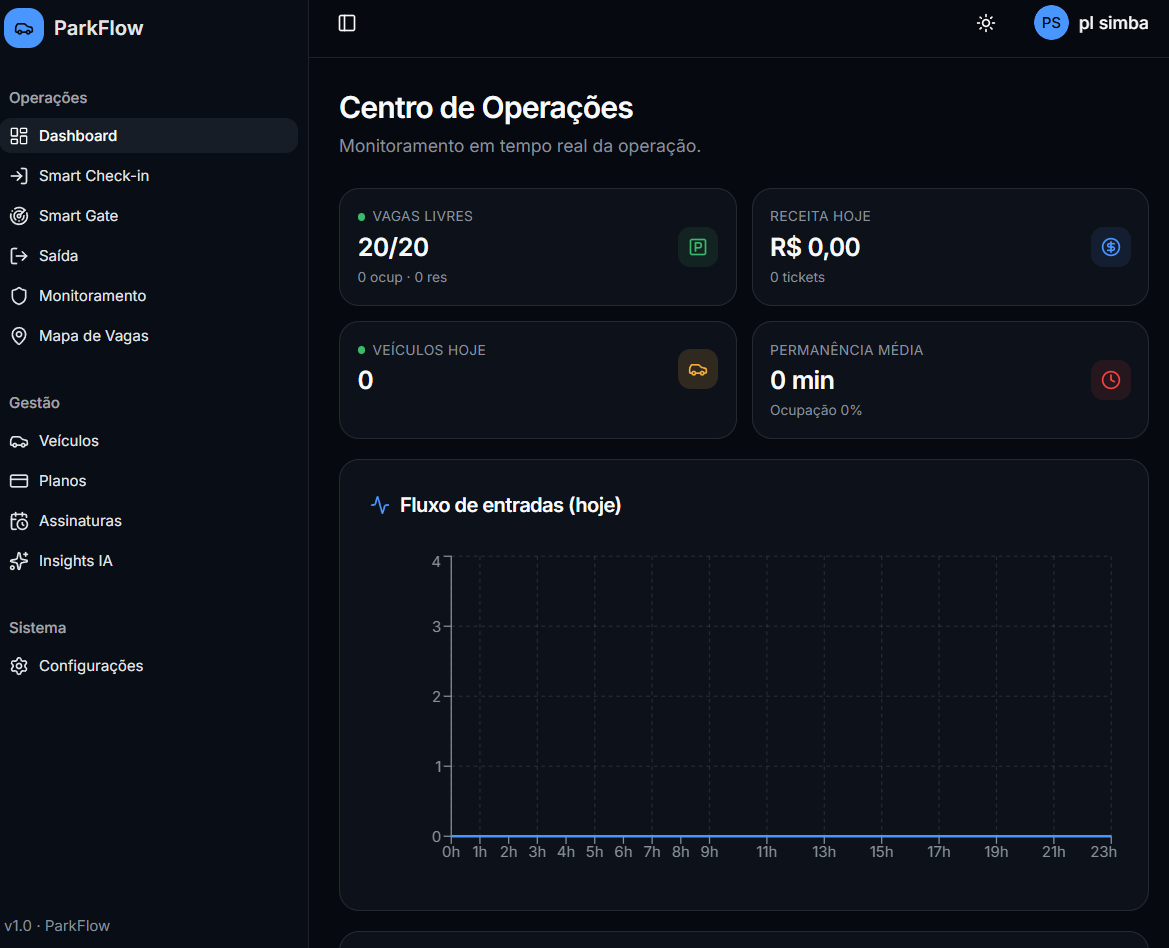
The main change was one of hierarchy. Instead of showing everything with the same weight, the interface started highlighting what the operator needs to track during work.
The most important UX decision: start with the license plate
The initial flow required a lot of data before registering an entry. That increased service time and repeated information from already registered customers.
The solution was to make the license plate the first step of the process.
flowchart TD
    A[Operador informa a placa] --> B{Veículo cadastrado?}
    B -- Sim --> C[Preencher dados existentes]
    B -- Não --> D[Cadastro rápido]
    C --> E{Existe entrada ativa?}
    D --> E
    E -- Sim --> F[Bloquear duplicidade]
    E -- Não --> G{Há vaga disponível?}
    G -- Não --> H[Informar estacionamento lotado]
    G -- Sim --> I[Registrar entrada]
    I --> J[Atualizar ocupação e dashboard]
This flow brought some important rules:
- optional CPF in quick registration;
- license-plate search;
- autofill for known vehicles;
- duplicate entry blocking;
- capacity validation;
- loading, success, and error states;
- keyboard-friendly use and use on mobile devices.
The improvement was not just visual. It changed the sequence of the operation to reduce friction.
Authentication and data isolation
One of the first problems found was instability in the authentication flows:
- sessions ending unexpectedly;
- login failures;
- sign-up not working correctly;
- password recovery with issues;
- protected routes needing review.
The fix had to consider more than the login screen. It was necessary to review:
- session persistence;
- tokens and storage;
- authentication provider configuration;
- callbacks and redirects;
- direct access to private routes;
- queries tied to the authenticated user.
Another central requirement was data isolation.
Conta A → somente dados da Conta A
Conta B → somente dados da Conta B
In a system with Supabase, this requires correctly filtered queries and access policies in the database. Hiding data in the frontend is not enough.
Data integrity: not everything should be deleted
An interesting problem appeared when removing a vehicle that already had registered entries.
The database blocked the deletion because there were historical records linked to the vehicle. Deleting everything in cascade would solve the technical error but would destroy operational and financial information.
The decision was to separate two scenarios:
| Situation | Behavior |
|---|---|
| Vehicle with no history | Can be permanently deleted |
| Vehicle with history | Must be archived |
| Currently parked vehicle | Removal must be blocked |
Archiving, also known as soft delete, removes the vehicle from operational listings without erasing old entries, exits, payments, or reports.
Fields planned for this strategy include:
archived_at timestamp null
archived_by uuid null
archive_reason text null
This decision showed why database rules cannot be treated as secondary interface details.
Safe deletion of zones and spots
Spot management also needed to allow deleting an entire zone without forcing the user to delete each spot individually.
But this action could not be unrestricted.
The defined flow was:
- select the zone;
- open a modal with the name and number of spots;
- report how many are free and occupied;
- block the operation if any spot is occupied;
- delete the zone only when all spots are free;
- preserve entry, exit, and payment history;
- automatically update the interface.
This is an important difference between “adding a button” and implementing a safe operation.
Full account backup and export
Another evolution was allowing the export of all of an account’s data, not just one category at a time.
The proposal considers three formats:
CSV
Since CSV does not support multiple tables in a single file, the idea is to generate a .zip containing separate files:
vehicles.csv
subscriptions.csv
plans.csv
access_logs.csv
entries_exits.csv
payments.csv
infractions.csv
parking_spots.csv
parking_zones.csv
settings.csv
XLSX
A spreadsheet with one tab per data type.
JSON
A structured file:
{
  "exportedAt": "2026-06-22T00:00:00.000Z",
  "ownerId": "identificador-da-conta",
  "data": {
    "vehicles": [],
    "subscriptions": [],
    "plans": [],
    "entriesExits": [],
    "payments": [],
    "parkingSpots": []
  }
}
The most important rule is that the export must respect the authenticated user and never include:
- data from other accounts;
- tokens;
- keys;
- environment variables;
- internal secrets;
- unnecessary sensitive information.
Smart Gate and future integrations
The Smart Gate was designed to demonstrate a possible automated flow for monthly subscribers:
flowchart TD
    A[Veículo se aproxima] --> B[Simular leitura da placa]
    B --> C[Buscar veículo e assinatura]
    C --> D{Plano ativo?}
    D -- Sim --> E[Simular acesso autorizado]
    E --> F[Registrar evento]
    D -- Não --> G[Exibir acesso negado]
The project was also planned for future integrations with:
- IP cameras;
- RTSP streams;
- OCR/LPR providers;
- barrier gate controllers;
- spot sensors;
- QR Code readers;
- thermal printers.
The documentation, however, makes the limitation clear: these features are simulated or planned. They do not represent an already validated physical integration.
This distinction matters so as not to present a prototype as if it were a production hardware system.
Outcome of the process
ParkFlow evolved from a visual MVP into a proposal with rules closer to a real product.
| Decision | Problem faced | Expected result |
|---|---|---|
| License-plate check-in | Repetitive typing | Faster service |
| Duplicate blocking | Two entries for the same vehicle | Operational consistency |
| Capacity control | Entry with no available spot | Reliable occupancy |
| Per-user isolation | Data mixing between accounts | Multi-user security |
| Vehicle archiving | Deletion breaking history | Record preservation |
| Safe zone deletion | Slow or risky administration | Controlled operation |
| Full export | Fragmented backup | Data portability |
| Modular prompts | Broad, unpredictable changes | Incremental refinement |
What I learned
1. Requirement is not the same as a ready feature
Documenting a need is only the beginning. Availability, encryption, backup, and performance need to be implemented and measured.
2. UX depends on the operational context
The best form is not necessarily the one that collects the most data. In a parking lot, starting with the license plate makes more sense than starting with the CPF.
3. History integrity should guide the database
Deleting a primary record can affect entries, payments, and reports. In some cases, archiving is better than deleting.
4. Security must exist in the database
Filtering data only in the interface does not guarantee isolation. Rules must be enforced in queries and access policies.
5. Better prompts work as specifications
Providing context, constraints, business rules, and acceptance criteria produces more predictable results than generic requests.
6. Simulation must be presented as simulation
Prototypes can demonstrate advanced ideas, but they need to clearly communicate what is real, what is simulated, and what is still on the roadmap.
Next steps
The project documentation points to the following priorities:
- fully validate login, sign-up, recovery, and session persistence;
- test data isolation with different accounts;
- confirm check-in and check-out rules;
- validate billing calculation and monthly subscribers;
- review the actual Supabase migrations;
- create tests for the most critical rules;
- improve accessibility and responsiveness;
- implement real integrations only after technical definition and testing;
- review LGPD, backup, and audit requirements before any production use.